
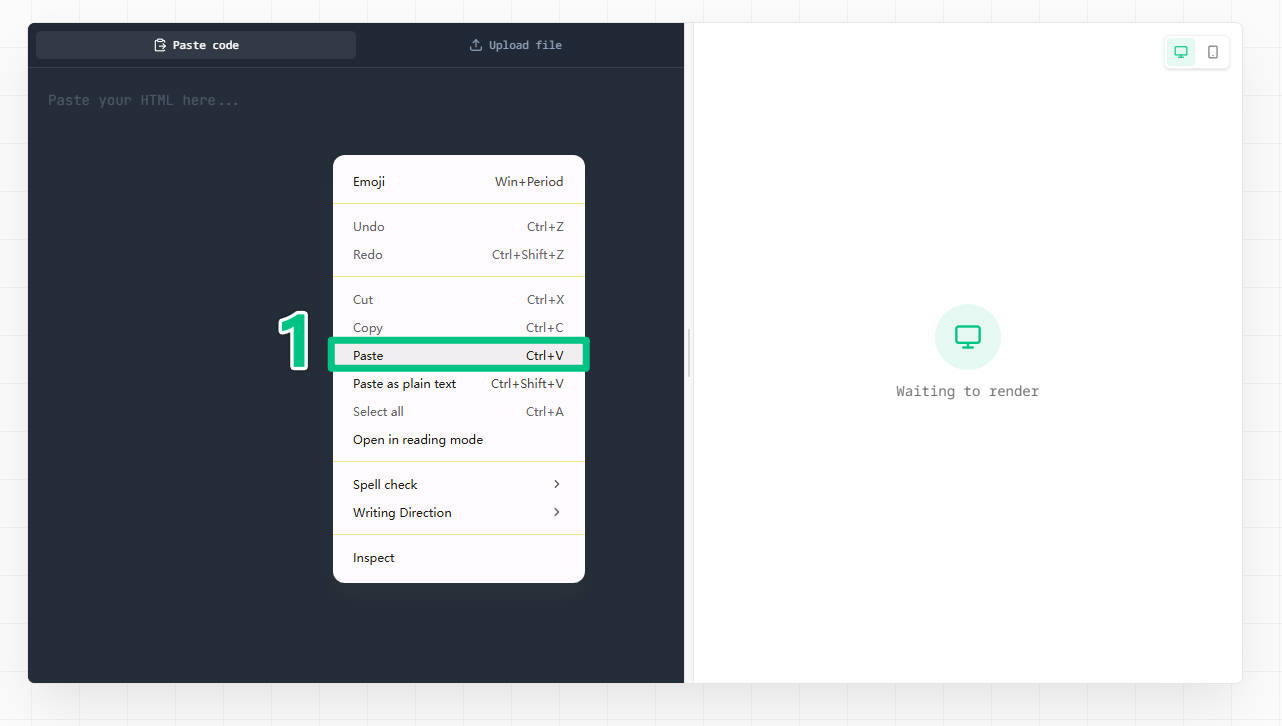
1
Paste code into HTML Preview Online
Start HTML Preview Online with code from an AI tool, code editor, saved .html file, copied snippet, or reusable template.
HTML Preview Online is a free HTML preview tool for previewing HTML code online, running an HTML file preview, and checking a live HTML preview before sharing a URL. The wheel name picker below is only an example workflow.
HTML Preview Online supports HTML code preview, HTML file preview, and live HTML previewer workflows.
HTML Preview Online
Workflow example
This wheel name picker is an HTML Preview Online example: paste HTML preview code, check the live HTML preview, publish it, and copy the public URL.
Start HTML Preview Online with code from an AI tool, code editor, saved .html file, copied snippet, or reusable template.
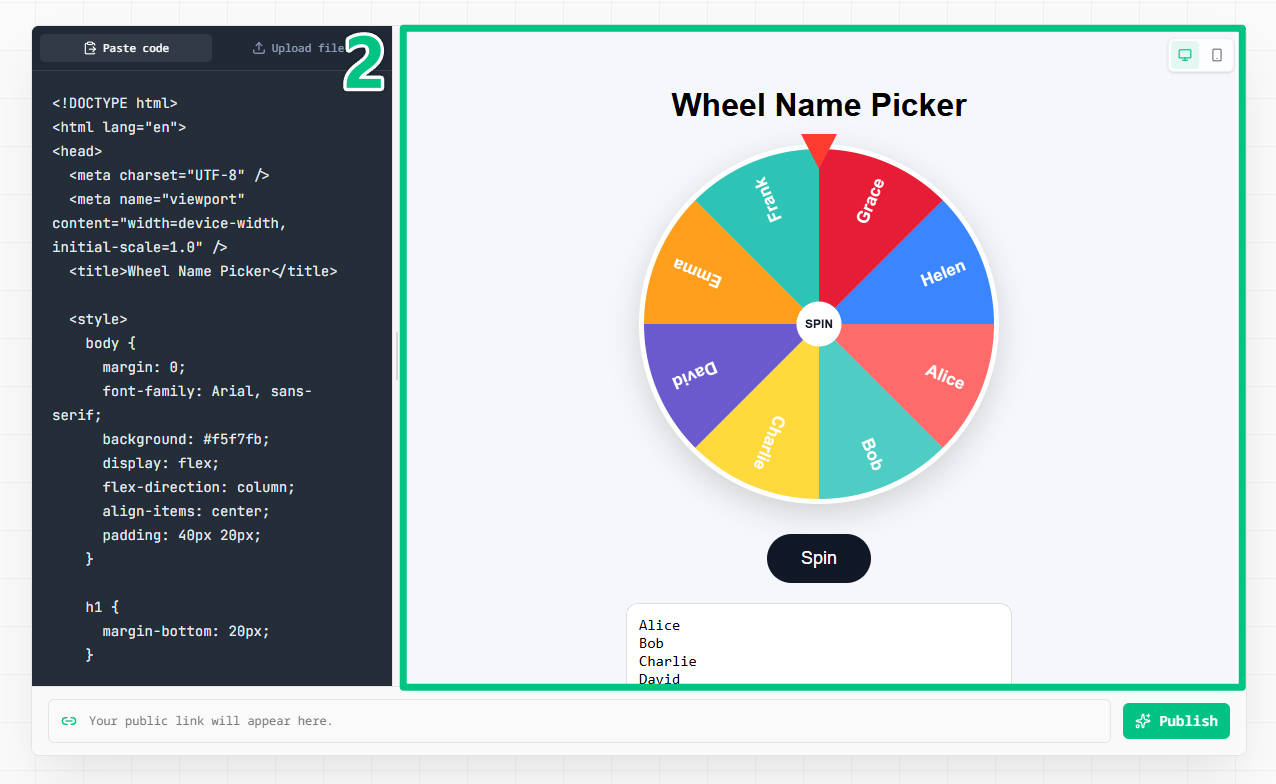
Use the HTML Preview Online live previewer to check the rendered page, layout, text, styles, scripts, and mobile view before publishing.

Generate a browser-ready URL from HTML Preview Online only after the HTML code preview looks correct and is safe to share.
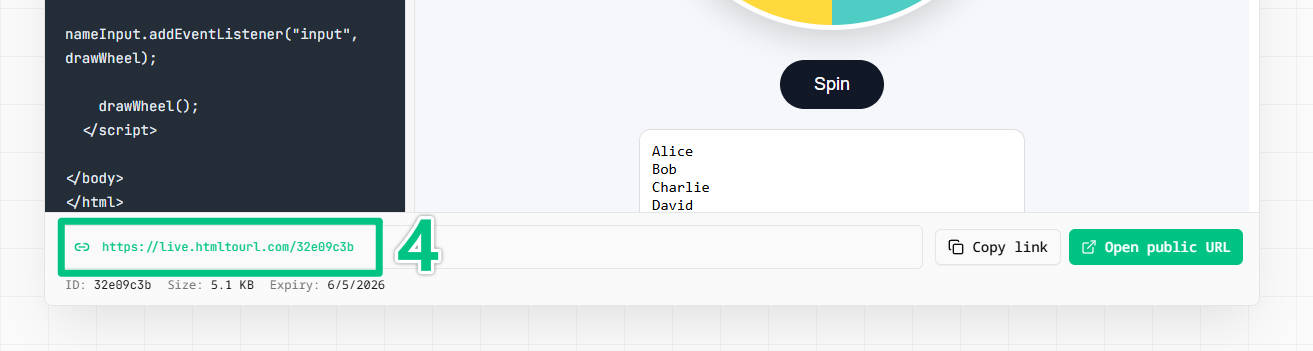
Share the finished HTML Preview Online link through email, Slack, docs, tickets, or classroom platforms.
You can paste a complete document into HTML Preview Online, use a smaller snippet, or upload an existing .html file from your computer. A complete document is usually easier for HTML file preview because it keeps the page structure, title, inline CSS, and inline scripts in one place. Before rendering the page, remove private notes, passwords, API keys, internal URLs, and customer data. The browser shows the page much as a visitor would see it, so treat the content as something that may eventually be shared.
The first render in HTML Preview Online should be simple. Paste your code or upload a local .html file, and the resulting page appears in the browser. This live HTML previewer works for code written by hand, exported from an editor, generated by an AI tool, or saved as a quick prototype. You do not need to create a repository, run a build, configure a web server, or deploy a website just to see the result. You get a fast visual check while the page is still easy to change.
Look beyond whether the page loads in HTML Preview Online. Check headings, spacing, colors, responsive layout, images, links, buttons, forms, and any small interactions in the HTML live preview. Pay special attention to local file references. Images, fonts, stylesheets, and scripts that only exist on your computer may not load for another person. Inline CSS and JavaScript travel with a complete document, while external assets should use URLs that another browser can reach.
The fastest workflow is not to publish first and inspect later. Preview HTML code online before generating a public link so the first shared version is already useful. This matters for client drafts, AI-generated landing pages, QA reproductions, classroom assignments, and one-page demos. First make sure the page is correct, then create the URL. That small pause reduces confusion and helps recipients focus on the version you intended to show.
Once the HTML Preview Online result looks right, turn it into a shareable URL. This lightweight workflow is ideal when you need one browser-ready page without a full hosting setup. Send the link through email, Slack, a ticket, a document, or a client message. The recipient opens it directly in a browser without downloading a file or copying code into an editor. For temporary demos and review links, that is often the shortest path from source code to useful feedback.
This tool is not a replacement for production hosting. It works best for single pages, prototypes, experiments, generated code, visual QA cases, and short-lived review links. Move to a normal hosting workflow when the project needs multiple routes, backend services, authentication, environment variables, a custom domain, deployment history, or a long-term production home. The value here is focus: paste code, inspect the result, and share one page quickly.
AI tools can create pages quickly, so a browser check is especially useful for generated code. Paste a landing page, pricing table, newsletter, dashboard mockup, or teaching example and inspect the result immediately. Look for placeholder links, invented claims, unnecessary scripts, poor contrast, broken mobile layouts, and content that should not be public. Fast rendering speeds up inspection, but it does not replace judgment.
Four-step workflow
Use HTML Preview Online to paste HTML preview code, run a live HTML preview, inspect the page, and create a browser link without a deployment pipeline.
Start with source code from your editor, an AI tool, a saved .html file, or a one-page prototype.
Render the page in your browser and check the layout, text, images, CSS, scripts, and responsive behavior.
Update broken paths, placeholder text, missing styles, or layout issues before anyone else opens the page.
Create a hosted link and send it through email, Slack, tickets, docs, or client messages.
Use HTML Preview Online whenever one HTML page needs a fast browser check before it is shared or deployed.
Use HTML Preview Online to paste a snippet or complete document and inspect the rendered result without setting up a local server.
Use HTML Preview Online to upload a saved .html file from your computer and check how the page renders in a browser.
Use a live HTML previewer when you want to see changes as a browser-ready page before sharing.
Check HTML preview code from an editor, AI tool, lesson, or prototype without installing software.
Inspect pages from ChatGPT, Claude, Cursor, v0, Bolt, Lovable, and other AI tools before sharing.
Review landing page drafts, mockups, and one-page concepts with a browser-ready link.
Share a focused visual reproduction so teammates can inspect the same rendered page.
Preview HTML assignments and share a link that opens directly for teachers or classmates.
Preview first
Use HTML Preview Online when you need to inspect and share one page quickly. Use production hosting when the project grows beyond a single document.
Paste your source into HTML Preview Online and see the rendered browser output before you publish a link.
Skip Git, FTP, DNS, CI, and hosting dashboards when one page only needs a quick check.
Send reviewers a URL instead of asking them to save a file or run code locally.
Move to a full deployment workflow when the page becomes a multi-route website or application.
Treat every HTML Preview Online link as shareable. Review the source, HTML preview code, and rendered page before creating a URL.
Do not include passwords, API keys, customer details, internal notes, or confidential content.
Use reachable URLs for images, fonts, stylesheets, and scripts that must load for other viewers.
Review AI-generated code for placeholder claims, extra scripts, broken links, and accessibility issues.
Choose a production deployment for apps that need routes, backend services, auth, or long-term hosting.
Answers about HTML preview online, HTML file preview, live HTML previewers, and HTML code preview workflows.
Use HTML Preview Online by pasting your code or uploading an .html file in the homepage tool. The browser renders the page so you can inspect the layout, content, CSS, scripts, and assets before generating a shareable URL.
Yes. HTML Preview Online lets you preview HTML code online for free by pasting the code, inspecting the rendered result, and creating a browser-ready link without installing software or registering an account.
HTML Preview Online is an HTML preview tool that renders HTML code in a browser so you can check the page visually before sharing it. It helps with HTML code preview, HTML file preview, generated pages, lessons, demos, and quick client reviews.
Complete documents with inline CSS and JavaScript can be rendered. External images, stylesheets, fonts, and scripts should use reachable web URLs if another person needs to open the shared page.
Yes. HTML Preview Online supports HTML file preview. Upload a saved .html file or paste its source code, then inspect the rendered page in your browser before creating a shareable link.
HTML live preview is the review step where you inspect the rendered page. A public URL is created after the preview looks right, so someone else can open the page directly in a browser.
HTML Preview Online is for quickly rendering and sharing one page. Website hosting is for production sites and applications that need routes, deployments, custom domains, backend services, or long-term operation.
Yes. Paste code from ChatGPT, Claude, Cursor, v0, Bolt, Lovable, or another AI tool into the page. Review the source and rendered result carefully before sharing the URL.
Generated user pages are served with noindex-oriented defaults. SEO landing pages such as this one remain indexable so people can discover the tool.
Open HTML Preview Online, paste HTML code or upload a file, inspect the live HTML preview, and generate a shareable browser link in seconds.